Visium HD End-to-End Pipeline
This tutorial walks through end‑to‑end processing of 10x Visium HD data with CartLoader: converting inputs, running FICTURE, importing cell results and histology, packaging assets, and uploading for sharing.
Legacy
This tutorial uses run_visiumhd, a legacy orchestrator superseded by run_together, which runs the same stages for the standard Space Ranger layout (and multiple samples with a joint model) and is the recommended workflow. The page is kept for existing users; see Legacy Orchestrators.
Known issue: combining --run-ficture2 with --run-cartload2 in one run_visiumhd call, as in the examples below, currently fails at the packaging step. Workaround: once FICTURE has finished, run run_cartload2 directly with --fic-dir <out-dir>/ficture2, then upload; see Legacy Orchestrators.
Prepare Input
Data Access
Download the ST data from the 10x Genomics Dataset portal.
If you have wget installed, use the following commands to download the output from 10X.
1 2 3 4 5 6 7 8 9 10 11 12 13 14 15 16 17 18 19 | |
If you have curl installed, use the following commands to download the output from 10X.
1 2 3 4 5 6 7 8 9 10 11 12 13 14 15 16 17 18 19 | |
There is no need to extract the .tar.gz archives: --load-space-ranger (below) finds the files it needs inside them and extracts them under <out-dir>/unzip/.
Data Structure and Format
See Space Ranger output details in the official documentation: Space Ranger Outputs
1 2 3 4 5 6 7 8 9 10 11 12 13 14 15 16 17 18 19 20 21 22 23 24 25 26 27 28 29 30 31 32 33 34 35 36 37 38 39 40 41 42 43 44 45 | |
Visium HD slides use a 2×2 µm grid of barcoded squares (square_002um) for high-resolution spatial gene mapping. Use filtered_feature_bc_matrix to only process tissue-associated signals.
ATTENTION
The file‑format examples below use a sample Visium HD dataset. Paths, IDs, and values are illustrative and may not match the dataset used in this tutorial.
SGE comprises several key files as follows:
filtered_feature_bc_matrix/barcodes.tsv.gz – spatial barcode for tissue locations
1 2 3 | |
- Column 1: Spatial barcodes corresponding to specific locations on the tissue section.
filtered_feature_bc_matrix/features.tsv.gz – feature metadata
1 2 3 | |
- Column 1: Feature ID
- Column 2: Feature symbol
- Column 3: Feature type
filtered_feature_bc_matrix/matrix.mtx.gz – expression count matrix
1 2 3 4 5 6 | |
Header: Initial lines form the header, declaring the matrix's adherence to the Market Matrix (MTX) format, outlining its traits. This may include comments (lines beginning with%) for extra metadata, all marked by a “%”.Dimensions: Following the header, the first line details the matrix dimensions: the count of rows (features), columns (barcodes), and non-zero entries.Data Entries: After the dimensions, each subsequent line provides three fields: row index (feature index), column index (barcode index), and the expression-count value.
tissue_positions.parquet – spatial barcode metadata
1 2 | |
barcode: Unique spatial barcode associated with each capture spot.in_tissue: Binary flag (1 = in tissue, 0 = background) indicating whether the spot falls within the tissue boundary.array_row,array_col: Integer indices representing the position of the spot on the capture array grid.pxl_row_in_fullres,pxl_col_in_fullres: Floating point coordinates locating the spot in full-resolution tissue image pixels.
scalefactors_json.json – pixel-to-micrometer scaling factors
1 2 3 4 5 6 7 8 9 | |
spot_diameter_fullres: Estimated diameter of a barcoded spot in full-resolution pixels.bin_size_um: Physical size (in micrometers) of the smallest bin, typically 2.0 µm for Visium HD.microns_per_pixel: Resolution of the full-res image, used to convert pixel distances to micrometers.regist_target_img_scalef: Scaling factor applied during image registration to the target image.tissue_lowres_scalef: Downscaling factor from full-res to low-resolution tissue image.fiducial_diameter_fullres: Diameter of fiducial markers in full-resolution pixels, useful for alignment.tissue_hires_scalef: Downscaling factor from full-res to high-resolution tissue image.
Cell Segmentation Mask
Location: segmented_outputs/cell_segmentations.geojson
1 2 3 4 5 6 | |
- One polygon per segmented cell, with vertices in full-resolution image pixels (converted to µm with
microns_per_pixelfromscalefactors_json.json). cell_id: integer cell ID; cellNis barcodecellid_00000000N-1(zero-padded to 9 digits) in the cell feature matrix.
Cell Feature Matrix
Location: segmented_outputs/filtered_feature_cell_matrix
This contains barcodes.tsv.gz,features.tsv.gz, matrix.mtx.gz, providing cell id, feature information, and expression count matrix, respectively.
Clusters
Location: segmented_outputs/analysis/clustering/gene_expression_graphclust/clusters.csv
1 2 3 | |
Differentially Expressed Genes
Location: segmented_outputs/analysis/diffexp/gene_expression_graphclust/differential_expression.csv
1 2 3 | |
Define ID and Parameters
1 2 3 4 5 6 7 8 9 | |
How to define scaling for Visium HD?
10x Visium HD provides scalefactors_json.json (pixel‑to‑µm). CartLoader accepts it via --scale-json and computes the scaling automatically, so you don’t need to manually specify --units-per-um.
Alternatively, provide the scale directly with --units-per-um.
Example Runs
Choose one of the following options to run the run_visiumhd pipeline, either locally or with Docker. Add --import-squares to either command to also import the Space Ranger 8 µm and 16 µm square-bin results.
Run Pipeline Locally
Set Up Environment
1 2 3 4 5 6 7 8 9 10 | |
No tool paths needed
Once submodules/build.sh has run (see Installation), every CartLoader command finds spatula, punkst, tippecanoe, pmtiles, and pmpoint in the submodules/ directory of the repository, and the default color map at assets/default_color_map.tsv. Pass --spatula, --ficture2 (the punkst repository directory, which contains bin/punkst), --tippecanoe, --pmtiles, or --cmap-file only to use a different build or file. upload_aws runs the aws CLI from your PATH (--aws to override).
Example Command
1 2 3 4 5 6 7 8 9 10 11 12 13 14 15 16 17 18 19 | |
Run Pipeline via Docker
Set Up Environment
1 2 3 4 5 6 7 8 9 | |
Using the Docker image
- The image's entry point is
cartloader: whatever follows the image name is acartloadersubcommand and its options (docker run --rm -v ${work_dir}:/data hyunminkang/cartloader:latest <command> [options]). - Paths passed to the command are container paths: with
-v ${work_dir}:/data, a host file${work_dir}/raw/x.csvis/data/raw/x.csv. - Every tool is built into the image, so no tool-path options are needed.
- Uploads need credentials inside the container: mount them read-only, e.g.
-v ${HOME}/.aws:/root/.aws:rofor AWS. latestis the most recent release; for reproducible runs use a dated tag (e.g.hyunminkang/cartloader:20261007-1432).
Example Command
The ~/.aws mount gives the container your AWS credentials for --upload-aws.
1 2 3 4 5 6 7 8 9 10 11 12 13 14 15 16 17 18 19 20 21 22 23 | |
Customize Parameters
Action Flags to Enable Modules
Actions
run_visiumhd runs multiple CartLoader modules together; enable and combine actions with flags.
CartLoader Modules |
Flags in run_visiumhd |
Actions | Prerequisites |
|---|---|---|---|
load_space_ranger |
--load-space-ranger |
Summarize Space Ranger outputs into JSON | Space Ranger Output files |
sge_convert |
--sge-convert |
Convert SGE to CartLoader format; optional density filter and visuals |
Space Ranger assets JSON (from load_space_ranger) or transcript CSV/Parquet |
run_ficture2 |
--run-ficture2 |
FICTURE analysis | SGE (from sge_convert); FICTURE parameters (--width, --n-factor) |
import_visiumhd_cell |
--import-cells |
Import cell points, boundaries, cluster, de; | Space Ranger assets JSON or manual CSVs; also --cell-id |
import_visiumhd_square |
--import-squares |
Import square-bin (8 µm, 16 µm) points, clusters, de, UMAP; | Space Ranger assets JSON or --square-input; also --square-id |
import_image |
--import-images |
Import background images (BTF-TIFF) → PNG/PMTiles; | Space Ranger assets JSON or --tifs; also --image-ids/--all-images |
run_cartload2 |
--run-cartload2 |
Package SGE, optional FICTURE/cells/images into PMTiles; write catalog.yaml |
SGE, optional FICTURE assets or any imported cell/image assets; --id |
upload_aws |
--upload-aws |
Upload catalog and PMTiles to S3 | catalog.yaml (from run_cartload2); --s3-dir |
upload_zenodo |
--upload-zenodo |
Upload catalog and PMTiles to Zenodo | catalog.yaml (from run_cartload2); --zenodo-token |
Parameter Requirements by Action Flag
Below are explanations of the parameters used in the example. For the full list, see the run_visiumhd reference page.
| Parameter | Required when flags | Description |
|---|---|---|
--space-ranger-dir |
--load-space-ranger |
Space Ranger output directory to scan. |
--space-ranger-assets |
optional --load-space-ranger |
Output JSON manifest path (defaults under --out-dir). |
--width |
--run-ficture2 |
Hexagon width(s) in µm for training/projection. |
--n-factor |
--run-ficture2 |
Factor count(s) for FICTURE training. |
--cell-id |
--import-cells |
Asset ID/prefix for cell outputs. |
--image-ids or --all-images |
--import-images |
Choose specific image IDs or import all detected. |
--id |
--run-cartload2 |
Catalog ID (used in catalog.yaml and outputs). |
--s3-dir |
--upload-aws |
Destination S3 path (e.g., s3://bucket/prefix). |
--out-dir |
any action | Output root directory for generated artifacts. |
--dry-run, --restart |
optional (any) | Control execution (preview or rerun ignoring existing outputs). |
--n-jobs, --threads |
optional (any) | Parallelism for Make/GDAL/tippecanoe steps. |
Outputs
-
View/Explore
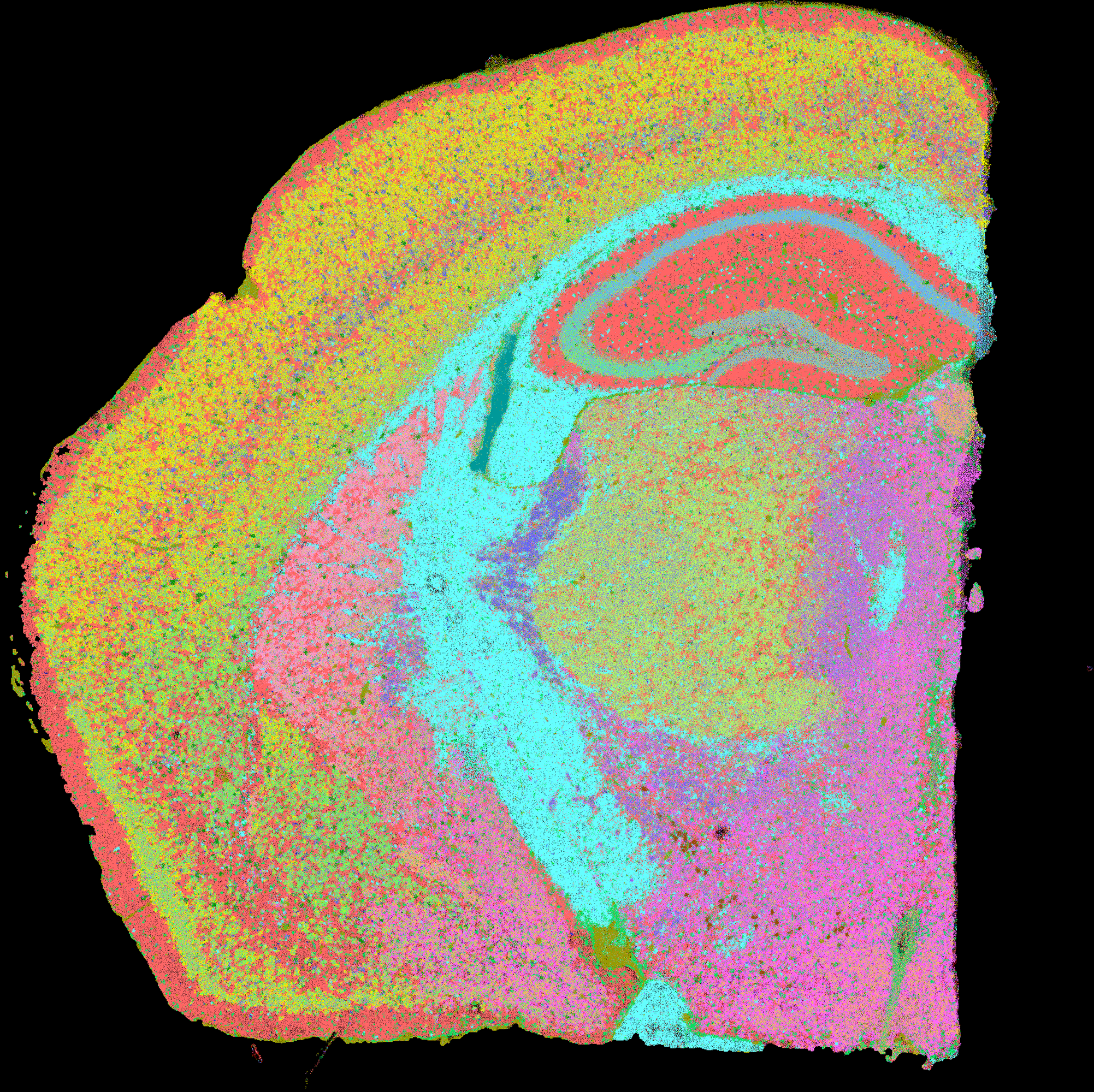
The outputs are available in CartoScope.
See output details in the reference pages for run_ficture2 and run_cartload2.