10x Visium HD Starter Tutorial
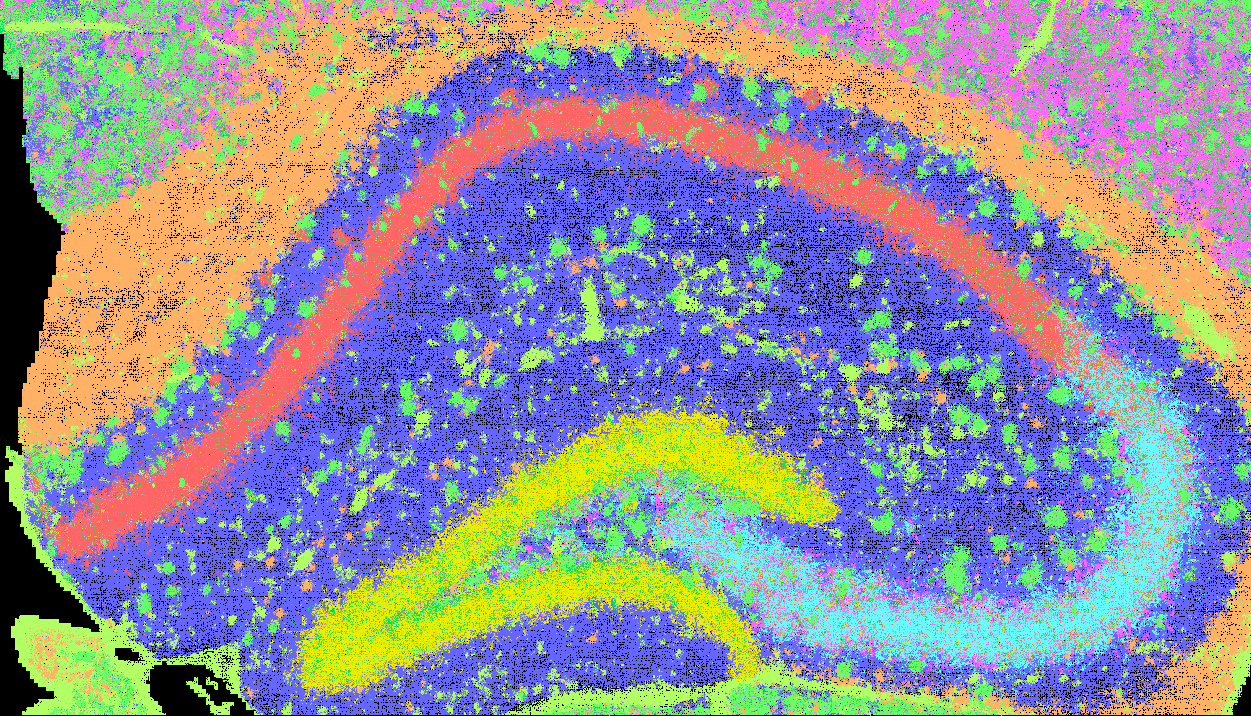
The input data originates from the mouse hippocampus and is extracted from an official release of mouse brain SGE data.
It first runs the whole analysis with a single run_together command, then walks through the same analysis step by step: input preparation, SGE format conversion, FICTURE analysis, asset packaging, and data upload.
Run with run_together
Download the example data, hosted on Zenodo (10.5281/zenodo.17953582), into a work directory:
1 2 3 4 | |
The 10x Visium HD profile expects a Space Ranger outs/ directory, where these files sit under binned_outputs/square_002um/. The starter data keeps them flat in raw/, so write a small config file that points the profile at them (paths are relative to --in-dir):
1 2 3 4 5 6 7 8 9 10 11 | |
Then run the pipeline, either with a local installation or with the Docker image:
1 2 3 4 5 6 7 8 9 | |
1 2 3 4 5 6 7 8 9 10 | |
The result to deploy is out/visiumhd_hippo/cartl/visiumhd_hippo/ (a catalog.yaml and the PMTiles it lists). Add --dry-run to print the commands without running them. With a full Space Ranger outs/ directory, drop --config: the profile then also imports the segmented cells, the 8 µm and 16 µm bins, and the H&E image when present.
How run_together differs from the step-by-step path
- FICTURE runs through
run_ficture2_multi(a joint model over a single sample) with single-molecule pixel decoding, instead ofrun_ficture2. - Feature filters are the
run_togetherdefaults: control features (Unassigned,Neg,BLANK/Blank,Intergenic,Deprecated,System,NCS-,NCP-) are dropped at ingest; predicted (Gm<digit>), mitochondrial (mt-/MT-), and ribosomal (Rps/Rpl) genes stay in the data but are left out of the factor models. Change them with--ingest-exclude-feature-regexand--exclude-feature-regex. - Point layers are packaged with
pmpoint(--use-pmpoint, 500 gene bins) instead oftippecanoe. - Outputs go under
--out-dir:tsv/<id>/(converted SGE),fic/(FICTURE), andcartl/<id>/(PMTiles andcatalog.yaml; deploy this), instead ofsge/,ficture2/, andcartload2/. - Publishing is built in:
--s3-uploaduploadscartl/<id>/to S3 (see Publishing). For Zenodo, runupload_zenodooncartl/<id>/as in the step-by-step path.
Step by Step (Individual Commands)
The same analysis, one command at a time. Use it to understand each stage or to customize it.
Set Up the Environment
1 2 3 4 5 6 7 8 9 10 | |
No tool paths needed
Once submodules/build.sh has run (see Installation), every CartLoader command finds spatula, punkst, tippecanoe, pmtiles, and pmpoint in the submodules/ directory of the repository, and the default color map at assets/default_color_map.tsv. Pass --spatula, --ficture2 (the punkst repository directory, which contains bin/punkst), --tippecanoe, --pmtiles, or --cmap-file only to use a different build or file. upload_aws runs the aws CLI from your PATH (--aws to override).
Input Data
Use the data downloaded above.
Visium HD slides use a 2×2 µm grid of barcoded squares (square_002um) for high-resolution spatial gene mapping. Use filtered_feature_bc_matrix to only process tissue-associated signals.
ATTENTION
The file‑format examples below use a sample Visium HD dataset. Paths, IDs, and values are illustrative and may not match the dataset used in this tutorial.
SGE comprises several key files as follows:
filtered_feature_bc_matrix/barcodes.tsv.gz – spatial barcode for tissue locations
1 2 3 | |
- Column 1: Spatial barcodes corresponding to specific locations on the tissue section.
filtered_feature_bc_matrix/features.tsv.gz – feature metadata
1 2 3 | |
- Column 1: Feature ID
- Column 2: Feature symbol
- Column 3: Feature type
filtered_feature_bc_matrix/matrix.mtx.gz – expression count matrix
1 2 3 4 5 6 | |
Header: Initial lines form the header, declaring the matrix's adherence to the Market Matrix (MTX) format, outlining its traits. This may include comments (lines beginning with%) for extra metadata, all marked by a “%”.Dimensions: Following the header, the first line details the matrix dimensions: the count of rows (features), columns (barcodes), and non-zero entries.Data Entries: After the dimensions, each subsequent line provides three fields: row index (feature index), column index (barcode index), and the expression-count value.
tissue_positions.parquet – spatial barcode metadata
1 2 | |
barcode: Unique spatial barcode associated with each capture spot.in_tissue: Binary flag (1 = in tissue, 0 = background) indicating whether the spot falls within the tissue boundary.array_row,array_col: Integer indices representing the position of the spot on the capture array grid.pxl_row_in_fullres,pxl_col_in_fullres: Floating point coordinates locating the spot in full-resolution tissue image pixels.
scalefactors_json.json – pixel-to-micrometer scaling factors
1 2 3 4 5 6 7 8 9 | |
spot_diameter_fullres: Estimated diameter of a barcoded spot in full-resolution pixels.bin_size_um: Physical size (in micrometers) of the smallest bin, typically 2.0 µm for Visium HD.microns_per_pixel: Resolution of the full-res image, used to convert pixel distances to micrometers.regist_target_img_scalef: Scaling factor applied during image registration to the target image.tissue_lowres_scalef: Downscaling factor from full-res to low-resolution tissue image.fiducial_diameter_fullres: Diameter of fiducial markers in full-resolution pixels, useful for alignment.tissue_hires_scalef: Downscaling factor from full-res to high-resolution tissue image.
Define ID and Parameters
1 2 3 4 5 6 7 | |
How to define Scaling Factors for Visium HD?
10x Visium HD includes a scalefactors_json.json file that provides pixel-to-micrometer scaling information. CartLoader can directly accept this file via the --scale-json option and automatically compute the appropriate scaling factor, so you do not need to manually calculate and specify --units-per-um.
Alternatively, users may bypass the JSON file by directly providing a value through the --units-per-um option.
SGE Format Conversion
Convert the raw input to the unified SGE format. See more details in its Reference page.
1 2 3 4 5 6 7 8 9 10 | |
| Parameter | Required | Type | Description |
|---|---|---|---|
--platform |
required | string | Input platform (options: 10x_visium_hd, seqscope, illumina, 10x_xenium, bgi_stereoseq, cosmx_smi, vizgen_merscope, pixel_seq, nova_st, generic) |
--in-mex |
required | string | Input MEX directory holding barcodes.tsv.gz, features.tsv.gz, and matrix.mtx.gz |
--pos-parquet |
required | string | Path to tissue_positions.parquet, which gives each barcode's position |
--scale-json |
required 1 | string | Path to scalefactors_json.json, used to convert pixel positions to µm |
--out-dir |
required | string | Output directory for the converted SGE files |
--makefn |
string | File name for the generated Makefile (default: sge_convert.mk) |
|
--exclude-feature-regex |
regex | Pattern of feature names to drop (e.g. control probes) | |
--sge-visual |
flag | Draw the converted SGE as an image (xy.png) for a visual check |
|
--n-jobs |
int | Number of parallel jobs (default: 1) |
1: CartLoader needs the scale either from a JSON file (--scale-json, which must contain microns_per_pixel) or as a number (--units-per-um, pixels per µm).
FICTURE Analysis
Compute spatial factors using punkst (FICTURE2). See more details on the Reference page. For Visium HD, --decode-scale 2 draws the factor image at 2 µm per pixel, the bin size.
1 2 3 4 5 6 7 8 9 10 11 12 13 | |
| Parameter | Required | Type | Description |
|---|---|---|---|
--main |
required 1 | flag | Run all five main steps |
--in-transcript |
required | string | Path to the transcript-indexed SGE file from sge_convert |
--out-dir |
required | string | Output directory |
--width |
required | int or comma-separated list | Hexagon width(s) in µm for LDA training |
--n-factor |
required | int or comma-separated list | Number(s) of LDA factors; one model per width × factor combination |
--makefn |
string | File name for the generated Makefile (default: run_ficture2.mk) |
|
--in-feature |
string | Path to the per-gene count file from sge_convert (default: the feature list made during tiling) |
|
--in-minmax |
string | Path to the coordinate min/max file from sge_convert (default: the range computed during tiling) |
|
--exclude-feature-regex |
regex | Feature names to leave out of the factor analysis. punkst matches the whole name, so end each alternative with .* or $ as needed (the example drops mitochondrial mt-* and predicted Gm<digits> genes) |
|
--cmap-file |
string | Color map TSV (default: assets/default_color_map.tsv in the CartLoader repository) |
|
--n-jobs |
int | Number of parallel jobs (default: 1) |
|
--threads |
int | Number of threads per job (default: 4) |
1: CartLoader requires at least one action: --tile (tiling), --segment (hexagon segmentation), --init-lda (LDA training), --decode (pixel-level decoding), --umap (UMAP of the factors), or --main for all five.
CartLoader Asset Packaging
Package the SGE and the FICTURE results into PMTiles and a catalog.yaml for CartoScope. See more details in its Reference page.
1 2 3 4 5 6 7 | |
Packaging without factor analysis
To host only the SGE (no factors), use cartloader run_together ... --no-ficture, which tiles the transcripts and packages them without training any model.
| Parameter | Required | Type | Description |
|---|---|---|---|
--fic-dir |
required | string | FICTURE output directory from run_ficture2; must contain ficture.params.json (the SGE paths are read from it) |
--out-dir |
required | string | Output directory for the PMTiles, assets, and catalog.yaml |
--id |
required | string | Dataset ID used in the catalog and output metadata (no whitespace) |
--makefn |
string | File name for the generated Makefile (default: run_cartload2.mk) |
|
--n-jobs |
int | Number of parallel jobs (default: 1) |
|
--threads |
int | Number of threads per job (default: 4) |
|
--spatula, --tippecanoe, --pmtiles |
string | Tool paths (default: the copies built under submodules/) |
Upload to Data Repository
Choose a data repository to host/share your output
CartLoader supports two upload options (AWS and Zenodo) for storing PMTiles of SGE and spatial factors in a data repository.
Choose the one that best suits your needs.
Upload the generated CartLoader outputs to your designated AWS S3 directory. The aws CLI must be configured with credentials that can write there (see AWS Upload Failures).
1 2 3 4 5 6 7 | |
| Parameter | Required | Type | Description |
|---|---|---|---|
--in-dir |
required | string | Directory with the CartLoader packaging output (containing catalog.yaml) |
--s3-dir |
required | string | Target S3 directory |
--profile |
string | AWS CLI profile to use | |
--aws |
string | Path to the AWS CLI (default: aws) |
|
--n-jobs |
int | Number of parallel jobs (default: 2) |
Upload the generated CartLoader outputs to a new Zenodo deposition or an existing one (see Zenodo Setup for the access token).
1 2 3 4 5 6 7 8 9 | |
| Parameter | Required | Type | Description |
|---|---|---|---|
--in-dir |
required | string | Directory with the CartLoader packaging output |
--zenodo-token |
required | string | Path to the file holding your Zenodo access token |
--upload-method |
string | Which files to upload: all (every file in --in-dir; default), catalog (the files listed in catalog.yaml), or files (the names given with --files) |
|
--catalog-yaml |
string | Catalog to read with --upload-method catalog (default: <in-dir>/catalog.yaml) |
|
--zenodo-deposition-id |
string | Existing deposition to upload into (default: create a new one) | |
--title |
required 1 | string | Title of the deposition |
--creators |
required 1 | list of str | Creators in "Lastname, Firstname" format, each quoted |
--description |
string | Description of the deposition |
1: Required when creating a new deposition, or when the existing one lacks it.
Output Data
-
 ---
---View/Explore
The outputs are available in both CartoScope and Zenodo.
See output details in the reference pages for run_ficture2 and run_cartload2.