Gene Drawer
The Gene Drawer allows you to search for, filter, and visualize the spatial expression of specific genes. You can browse dataset-wide expression statistics, upload custom gene lists or gene group sets, customize color palettes, and add them as rendering layers to the map.
Interface
The Gene Drawer is organized into two primary top tabs: Gene List and Upload.
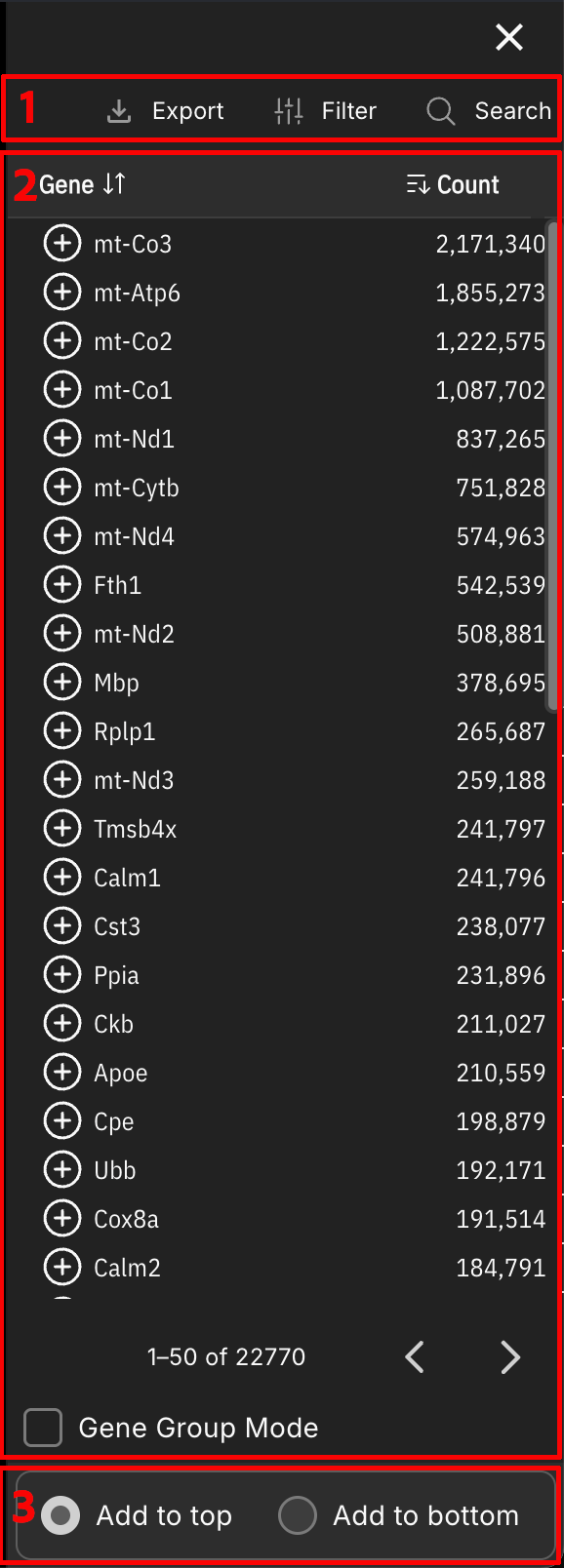
1. Gene List Tab
The default tab for discovering, searching, filtering, and adding individual gene layers or composite gene groups:
- Control Panel:
- Gene Group Mode: Toggle to enable gene group mode. In gene group mode, users can select multiple genes and combine them into a single layer with a shared color palette.
- Search: Search for genes by symbol using standard search with optional Match Case mode, or use Codex Search for command-line pattern matching.
- Filter: Filter genes by specific column values using standard filtering or Code Filter scripts.
- Export (TSV): Download the detected gene list with total expression counts.
- Gene Table & Layer Add (+):
- Sortable Headers: Click column headers to sort genes alphabetically or by transcript volume.
- Genes: Gene list body. Each gene row features an Add Layer (+) button on the left, gene symbol, and expression count. Click + to add a gene layer to the map.
2. Upload Tab
The Upload Tab allows you to import user-provided gene lists or custom gene group sets:
- Upload Custom Gene Set File: Import text, CSV, or TSV files containing pre-defined gene lists or gene group definitions.
- Batch Add Layers: Upon uploading a file, CartoScope displays an action page in the Upload tab summarizing the count of uploaded genes, matched genes, and missing genes. For matched genes, select specific entries to batch-add them as map layers.
3. Order Settings
Located at the bottom of the drawer:
- Layer Placement (Front / Back): Choose whether newly added gene layers or gene groups are placed at the Front (top) or Back (bottom) of the visual rendering stack.
Related Pages
Concepts
Manual Pages
How-to Guides